The triple A batteries are added through a door on the back of the computer. There is no data lost in the computer if the new replacement batteries are inserted with a minute or two. The power button is located on the bottom left of the PDA.
The Palm display area is divided into two sections, the much larger top section is primarily for viewing information. The bottom section is the primary section for entering commands. The bottom section is made up of two subsections. One section is stylus activated, where characters and numbers are entered and hotspots can be tapped to lead to specific applications. The stylus is inserted in a storage area on the back or side of the PDA and pulled out from the top of the PDA. This plastic tip device is used to tap the calculator buttons to complete calculations. Clicking the calculator button in the stylus area displays calculator functions in the large top display section.
Four of the bottom buttons lead to the basic PDA applications. Going left to right, the buttons are: calendar and event alarm; address and other contact data; to-do list management and the notepad writing function. Clicking the notepad button at the bottom far right displays lists of existing stored notes and text, which can be as extensive as entire books, including large works such as the Bible. New blank windows can be opened from here to enter and store new information.
It would seem a disadvantage that this 1998 model is no longer in style or currently available in stores. However, this has turned into an advantage for schools in that it is increasingly available from web sites selling older used and unused models. PDAs of this era that sold for close to $300 now can be found in the 30 to 100 dollar range depending on their condition. Visiting the pricewatch.com page and finding the link for lowest prices for PDAs shows several older models in this range. This is especially attractive for schools seeking to solve access and equity problems while in budget crisis.
Use the stylus to explore basic calculator functions. To prevent easy loss of the stylus, it is best to return it to its storage location in the PDA when not in use.
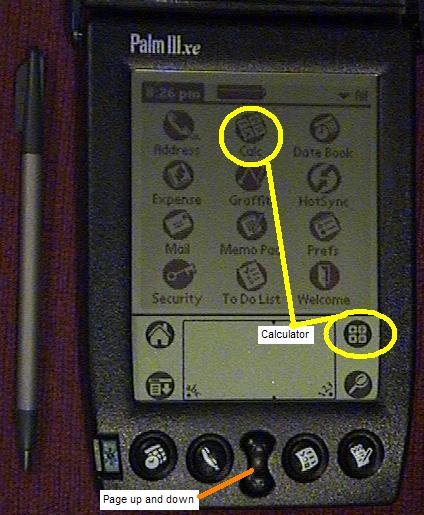
The two center buttons at the bottom act as page up and page down commands for moving through larger quantities of information.